Authentication requirements for BMW/MINI vary by region.
Outside the EU: Web-based consent flows are currently unavailable. To authenticate vehicles in these regions, you must use the Smartcar Android, iOS or Flutter SDKs.
Inside the EU: Smartcar integrates via the BMW Energy API. For specific details on this integration, please refer to our BMW Energy API guide.
Smartcar API will throw a CONNECTED_SERVICES_ACCOUNT - SUBSCRIPTION when the data we receive from the vehicle is older than a month as this normally indicates a subscription issue.
BYD accounts can only maintain one active session at a time. Vehicle owners should sign in with a dedicated BYD login for Smartcar that is separate from the credentials used in the BYD mobile app. If the same account signs into the OEM app after connecting through Smartcar, the Smartcar session will be revoked and require re-authentication.If customers reach out about being logged out of their BYD mobile app, we recommend instructing users to create a secondary BYD account exclusively for your app.
After 3-4 days of no activity, GM vehicles will enter a deep sleep state at which point they will no longer respond to API requests to preserve their 12v battery. In order to get data from the vehicle again, the car will need to go through an ignition cycle.
In order to avoid hitting UPSTREAM - RATE_LIMIT errors use batch requests and ping no more than once every 30 minutes. Use of the OEM app also counts towards the rate limit.
GM EVs do not expose a true remote “start charging” button the way some other brands do. Charging is controlled by an in-car Charge Now / Charge Later setting (and any departure / “ready by” schedule the owner configures on the vehicle screen):
Charge Now — the vehicle is willing to charge as soon as it is plugged in (up to its target charge level).
Charge Later — the vehicle stays idle when plugged in and only starts charging in its scheduled window. An idle car in this mode is working as intended, not stuck; it will still charge later when the schedule says so.
That Charge Now / Charge Later preference is stored on the vehicle and persists across plug / unplug cycles. Unplugging ends the current charge session, but it does not clear the schedule or switch the car back to Charge Now.Scheduling and the Charge Now / Charge Later toggle can only be changed from the vehicle screen. Neither the OEM mobile app nor the Smartcar API can rewrite that schedule or flip the car into Charge Now remotely.
A remote start-charge command (and raising the charge limit) only works for on-demand charging when the vehicle is already on Charge Now. If it is on Charge Later:
A start-charge or charge-limit change will not make it start immediately.
Only selecting Charge Now on the car will override the schedule for the current session.
GM may still accept the remote command and return a success-looking response even though the vehicle stays paused on its schedule.
When Smartcar can tell that start charge was blocked by an active charge schedule, the API surfaces that as a CHARGE_FAULT rather than a generic upstream failure, so clients can treat it as a vehicle configuration conflict instead of retrying forever.
GM charge status and plug status sometimes hold a stale value, so a car that is actually charging can still report as not charging (or the reverse). State of charge stays much more reliable. To confirm whether a car is charging, watch SOC rise over a few minutes rather than trusting charge status alone.
Hyundai and Kia vehicles in the US cap connection validity at 30 days. Owners must reconnect through Connect at least once a month to keep data flowing. This is a Hyundai/Kia US requirement, not a Smartcar limitation. Until the owner re-authorizes, the connection stops returning data and can look like a broken connection. Plan for the periodic reconnect in your onboarding and re-auth handling.
Mazda allows only one active session per account. Signing into the official Mazda app invalidates any active Smartcar session using those same credentials.It is recommended that users create a separate, secondary Mazda account used exclusively for your app integration. This warning is surfaced to users in the Smartcar Connect flow.
In the EU, only EQ models support control charge at this time. For EQE and EQS models, if the state of charge is lower than 20%, stop commands are rejected by Mercedes. For all other EQ models, if the state of charge is below 50%, stopping the charging process is rejected by Mercedes and the car will continue to charge until it reaches at least 50% for vehicle reliability reasons. See here for more details.
MG allows only one active session per account. Signing into the official MG app invalidates any active Smartcar session using those same credentials.It is recommended that users create a separate, secondary MG account used exclusively for your app integration. This warning is surfaced to users in the Smartcar Connect flow.
Vehicle owners may receive a notification from the MyNISSAN app stating “Success! We found the location of your vehicle. Check the map for the location of your YYYY Model.” every time the location endpoint is hit.The app appears to have an option to edit notifications, but as of Feb 2024 they are not available in the app. Notifications may need to be turned off at the iOS/Android level by the vehicle owner.
If you request control_charge permissions for PSA EVs, upon login owners will be presented with a PIN and MFA screen in Connect upon submitting their credentials. They will need to have set this up on their OEMs application in order to grant your application this permission.
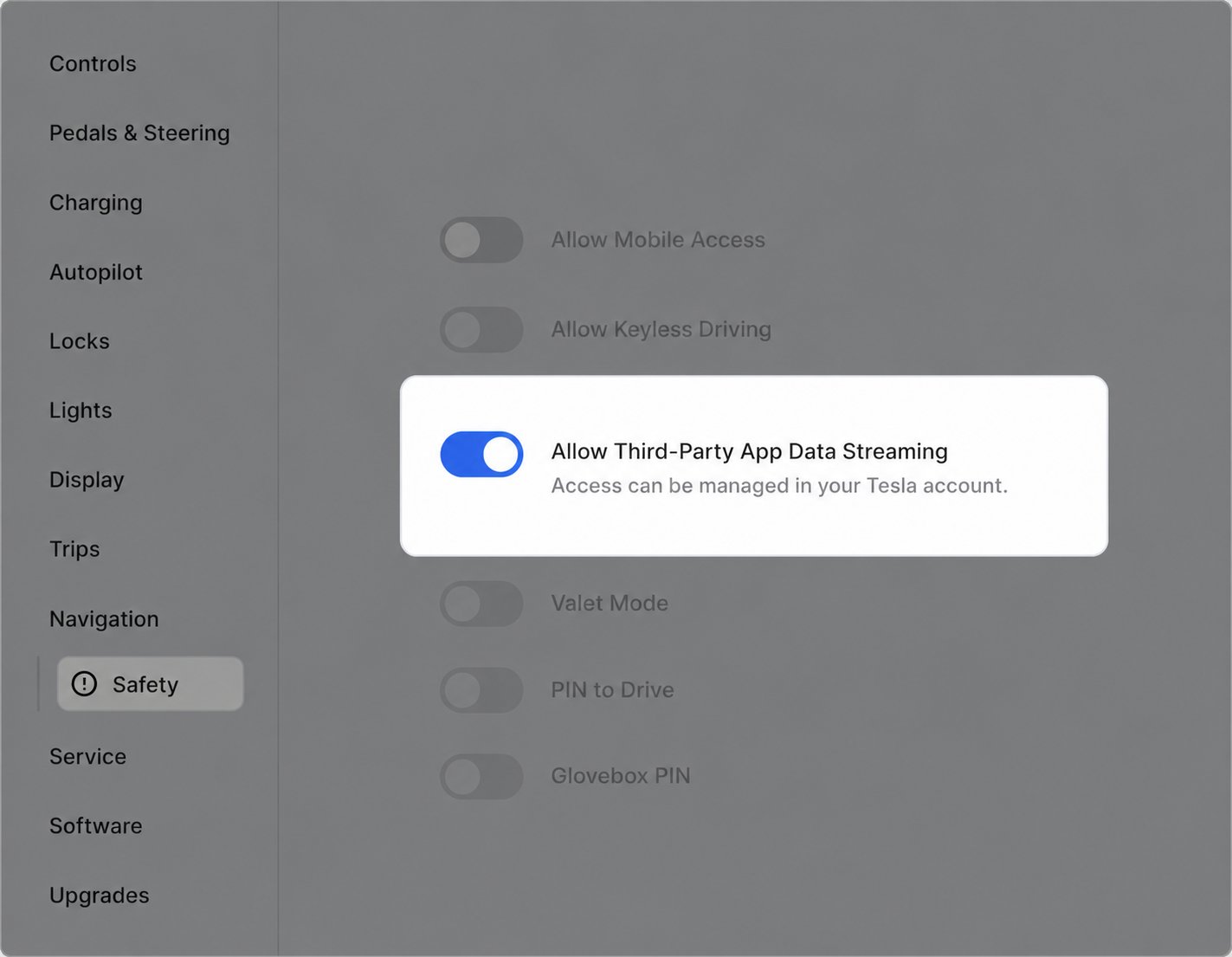
Legacy Model S and X vehicles (model year 2020 and earlier) don’t support Virtual Keys. On firmware 2025.20 and later they support third-party data streaming instead. The owner must turn on Allow Third-Party App Data Streaming in the vehicle’s Safety menu to maintain a reliable connection. When it’s disabled, Smartcar falls back to a reduced polling rate and data may be delayed. Smartcar shows owners how to enable it during Connect.
For enterprise customers, Tesla tenant setup must occur before any customer-facing Tesla vehicles are onboarded. Configure this during initial implementation, coordinated with Smartcar.
Changing Tesla tenant configurations after vehicles are already connected will require all affected users to re-authenticate. See OEM Migrations and Re-authentication for guidance on handling this scenario.
Volkswagen limits charge commands to safeguard battery longevity based on environmental and system conditions. Excessive consecutive requests may result in being temporarily rate limited. To restore functionality, the vehicle must be driven again.
CONNECTED_SERVICES_ACCOUNT errors on lock/unlock commands
In addition to verifying the VW account with the activation code, some cars will need to undergo the VW Ident Process before you can access remote lock/unlock functionality. This involves contacting the dealership to verify your ownership of the vehicle.
Upon purchasing (or activating the free trial), VW needs to review the request. You will get an email confirmation once they’ve cleared everything on their side.
In order to fully interact with Smartcar, the credentials need to be flagged as the primary driver. You’ll need to tap the “become primary driver” flow in the VW app. Depending on the model, this may require you to be in the car to interact with the infotainment system.A vehicle owner can verify whether or not they are the primary driver by following the steps below:
Open the VW mobile app tap the profile icon in the bottom right
Go to Vehicle Management
If there’s an Additional Users section, tap their name to see whether it says Primary User or Additional User
Volvo is an outlier regarding how unlock requests are processed. After initiating the request, after about 10 seconds you’ll need to open the trunk (boot) to successfully complete the request. You’ll know the car is ready to unlock the trunk as the hazard lights will flash. We recommend adding a notification for Volvos as part of the request loading animation to inform the user of this process.
Smartcar Connect currently checks for an email format, as such phone number usernames cannot be used. The owner will need to add their email to their Volvo account via the web portal.